
.png)
Description
Download FineVoice AI Voice Cloning – fast, secure AI voice generation tool
Overview of FineVoice AI Voice Cloning
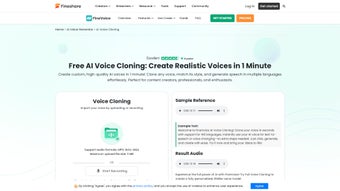
FineVoice AI Voice Cloning is a web‑based AI voice generation platform that lets you create a digital replica of your own voice in just one minute. Built on cutting‑edge deep‑learning models, the service analyzes a short audio sample, extracts the unique timbre, pitch, and cadence of the speaker, and then produces a fully editable voice model that can be used for podcasts, e‑learning, video narration, and even personal assistants. The software is offered under a full‑version license, which means you get unrestricted access to every feature without hidden limits or watermarks. Because it runs entirely in the cloud, there is no heavy local installation, making it ideal for creators who value speed and simplicity. FineVoice’s interface is intentionally minimal: a drag‑and‑drop area for your sample, a “Clone in 60 seconds” button, and a preview player that lets you hear the cloned output instantly. Security is a priority—your audio files are encrypted in transit and deleted after processing, ensuring privacy for both personal and professional users. Whether you are a marketer needing a consistent brand voice, a game developer looking for character dialogue, or an individual who simply wants to preserve a loved one’s speech, FineVoice delivers high‑quality, near‑real‑time voice cloning with a focus on usability and ethical safeguards.
Key Features of FineVoice AI Voice Cloning
- One‑Minute Cloning Process: Upload a 10‑second sample and receive a ready‑to‑use voice model within 60 seconds.
- High Fidelity Output: Generated audio retains natural intonation, breathiness, and emotional nuance.
- Web‑Based Dashboard: No downloads required; access your voice library from any modern browser.
- Unlimited Text‑to‑Speech: Convert unlimited scripts into speech using your cloned voice.
- Multi‑Format Export: Export audio as MP3, WAV, or OGG for seamless integration into any workflow.
- Voice Editing Tools: Adjust speed, pitch, and emphasis with built‑in sliders.
- Secure Data Handling: End‑to‑end encryption and automatic deletion of source files after processing.
- API Access: Integrate the cloning engine into third‑party apps, podcasts platforms, or e‑learning systems.
- Full‑Version License: One‑time payment unlocks all features, removes usage caps, and grants lifetime updates.
- Ethical Usage Controls: Built‑in watermark for generated audio and consent verification for voice owners.
Installation, Setup & Compatibility
FineVoice AI Voice Cloning eliminates the traditional software‑installation headache by operating entirely in the cloud. To get started, simply visit the official website, create a free account, and select the “Full Version” purchase option. After payment, you’ll receive an activation key that unlocks the premium dashboard. The platform supports all major operating systems because it runs in a browser—Windows 10/11, macOS Ventura and later, Linux distributions with a modern Chromium‑based browser, as well as mobile browsers on Android 9+ and iOS 13+. For power users, the service offers a RESTful API that can be called from desktop applications, server environments, or mobile apps, making it versatile for developers.
The onboarding workflow is deliberately straightforward:
- Log in to your FineVoice account.
- Click “Create New Voice”.
- Record or upload a clear 10‑second voice sample (recommended in WAV, 44.1 kHz).
- Press “Clone in 60 seconds”.
- Preview the generated voice and, if satisfied, save it to your library.
Because the heavy lifting happens on remote GPUs, your local device only needs a stable internet connection and a recent browser version (Chrome, Edge, Firefox, or Safari). No additional plugins or drivers are required, and the service automatically scales to handle high‑volume text‑to‑speech requests, so you can generate dozens of minutes of audio without performance degradation. For teams, FineVoice provides role‑based access control, allowing administrators to manage licenses and monitor usage from a central console.
Pros & Cons, Frequently Asked Questions & Final Thoughts
Pros
- Lightning‑fast one‑minute cloning makes it ideal for tight production schedules.
- High‑quality, natural‑sounding voice output that rivals professional studio recordings.
- Fully web‑based – works on Windows, macOS, Linux, Android, and iOS without extra installs.
- One‑time payment removes recurring fees and unlocks unlimited usage.
- Robust API enables integration with existing content pipelines.
Cons
- Requires a stable internet connection; offline use is not possible.
- Initial voice sample must be clean and noise‑free for best results.
- Pricing may be high for hobbyists compared to free, lower‑quality alternatives.
- Advanced customization (e.g., emotional tone) still relies on post‑processing.
- Legal and ethical considerations require users to obtain consent for cloning third‑party voices.
Frequently Asked Questions
How long does it take to clone my voice?
FineVoice processes a 10‑second sample and delivers a usable voice model in roughly 60 seconds, depending on server load.
Is my audio data safe?
All uploads are encrypted via HTTPS, stored temporarily, and automatically deleted after the cloning process completes.
Can I use the cloned voice for commercial projects?
Yes, the full‑version license grants commercial rights, provided you own or have consent for the original voice sample.
Do I need any special hardware?
No special hardware is required. A modern web browser and an internet connection are sufficient.
What formats can I export the generated audio in?
FineVoice supports MP3, WAV, and OGG exports, allowing seamless integration with most media workflows.
Conclusion – Is FineVoice AI Voice Cloning Right for You?
FineVoice AI Voice Cloning delivers on its promise of rapid, high‑quality voice synthesis without the traditional technical barriers. The cloud‑first architecture ensures that creators on Windows, macOS, Linux, Android, or iOS can access a professional‑grade voice model in under a minute, making it a compelling choice for marketers, educators, and developers alike. While the need for a clean input sample and a stable internet connection are sensible trade‑offs, the one‑time pricing model and unlimited usage unlock a level of flexibility that subscription‑based rivals often lack. If you’re looking to streamline your audio production pipeline, preserve a unique vocal identity, or simply experiment with AI‑driven narration, FineVoice provides a secure, ethical, and user‑friendly platform that lives up to modern expectations.
Ready to give your projects a human touch? Download FineVoice AI Voice Cloning now and start creating realistic voiceovers in seconds. Your free trial lets you test the core features, and the full‑version license removes all limits—so you can focus on what matters: delivering compelling content with a voice that truly sounds like yours.
Guides & Tutorials for FineVoice AI Voice Cloning
How to install FineVoice AI Voice Cloning
- Click the Preview / Download button above.
- Once redirected, accept the terms and click Install.
- Wait for the FineVoice AI Voice Cloning download to finish on your device.
How to use FineVoice AI Voice Cloning
This software is primarily used for its core features described above. Open the app after installation to explore its capabilities.
User Reviews for FineVoice AI Voice Cloning 0
No reviews found




